The whole snow school, from first booking to last chair.
SnoDesk puts online booking, the lesson board, the check-in desk, programs, student progress and instructor payroll in one system. Guests book on their phones, instructors see their day on theirs, and the office stops stitching it together by hand.
Lesson types, programs, levels, pay rates and seasons are all yours to define. The same system runs a busy public resort's walk-up desk and a private club's member families.
Resort ski schoolsPrivates, group lessons, first-timer packages
Private ski clubsMember families, charge to account
Your lesson types are yours. Name them, price them, set their levels and ratios, and match instructors by the disciplines they teach.
The gap
A snow school runs on a few hours of very busy mornings.
01
The line at the desk
Families waiting while someone hunts for a booking, a waiver, a payment and a class with room in it, all on different screens.
02
The whiteboard at 8:30
Lessons matched to instructors by memory. Someone who booked a specific pro gets someone else, and a level-2 kid ends up with the level-5s.
03
Payroll on Monday
Hours rebuilt from line-up sheets, request bonuses counted by hand, and the totals typed into accounting again.
A Saturday on the hill
Booked online. Run from one board.
Thursday night
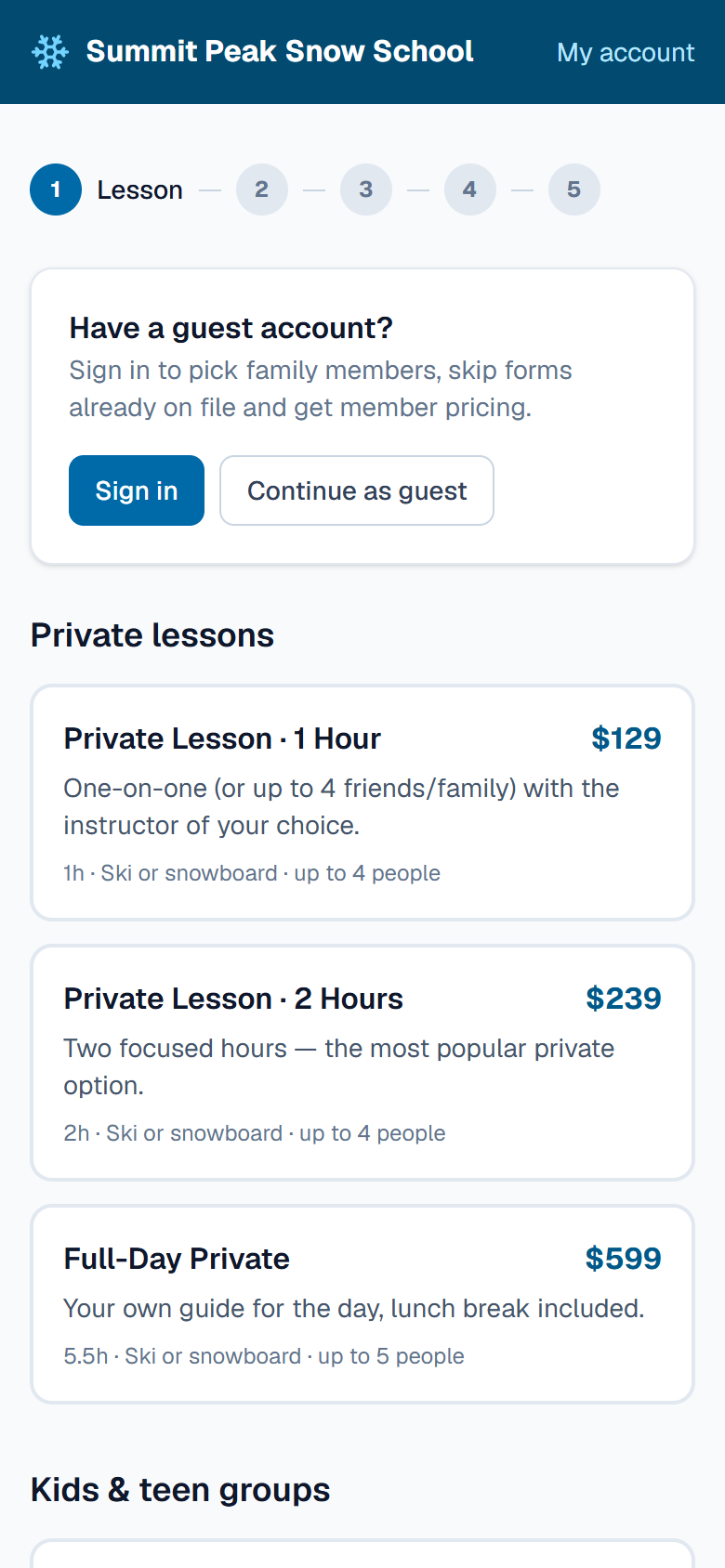
Families book from the couch.
Guests pick a lesson or program, choose a time, request their favourite instructor, sign the waiver and pay by card. Returning families sign in with a code sent to their email and pick their kids from a list.
Request a favourite instructor
Waivers signed before they arrive
Member pricing for signed-in families
7:45 AM
The board fills before line-up.
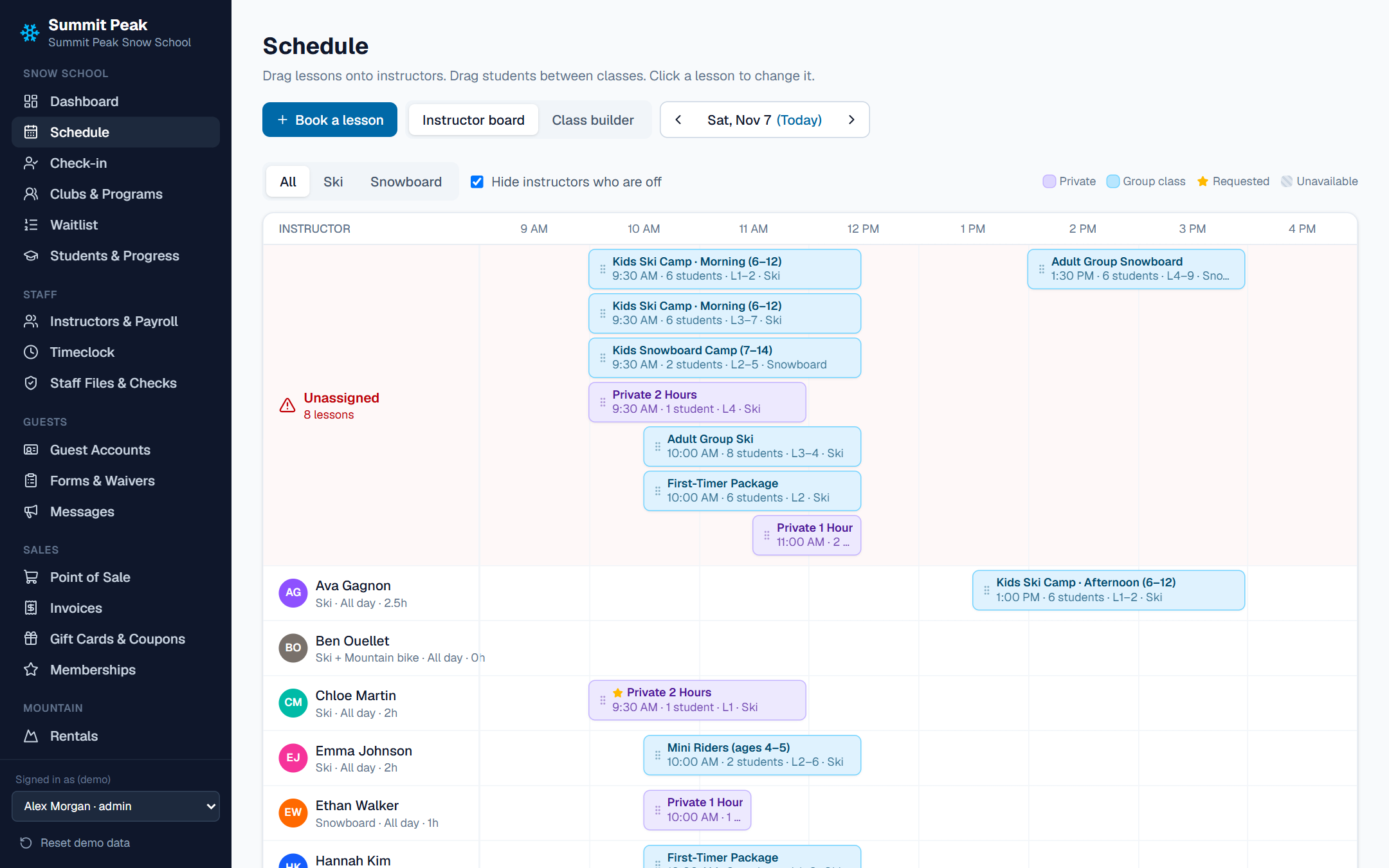
The supervisor drags lessons onto instructors. Conflicts, days off and the wrong discipline are blocked, requested pros are starred, and group classes split by level with the class builder.
Unassigned lessons flagged in red
Auto-split groups by level
Utilization for every instructor
Schedule · Instructor board
8:40 AM
The desk line moves.
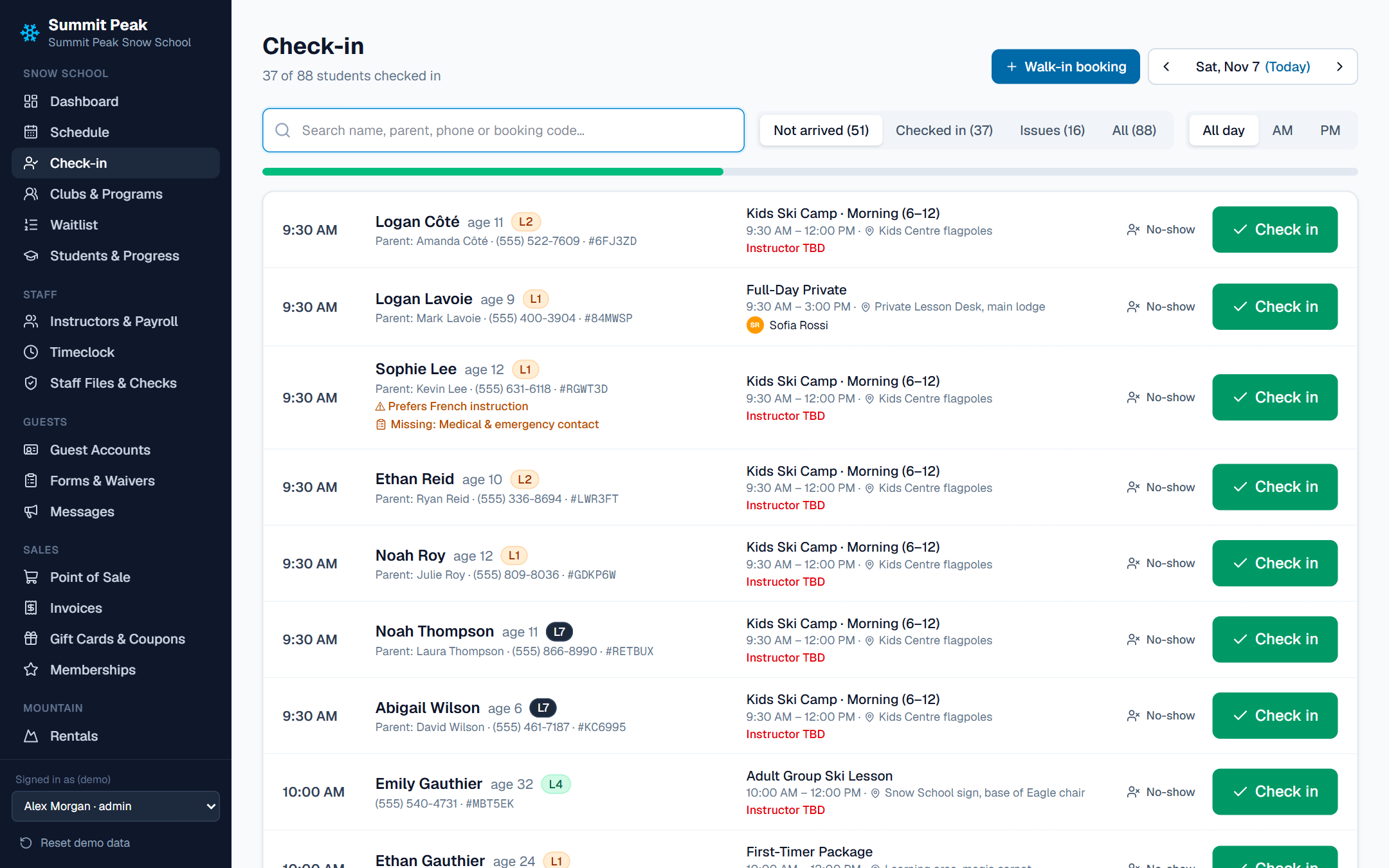
Find a family by name, parent, phone number or booking code. Missing waiver? Sign it at the desk. Unpaid? Take payment right there. One more tap and they're checked in.
Card, cash, gift card or member account
Walk-ups booked in the same screen
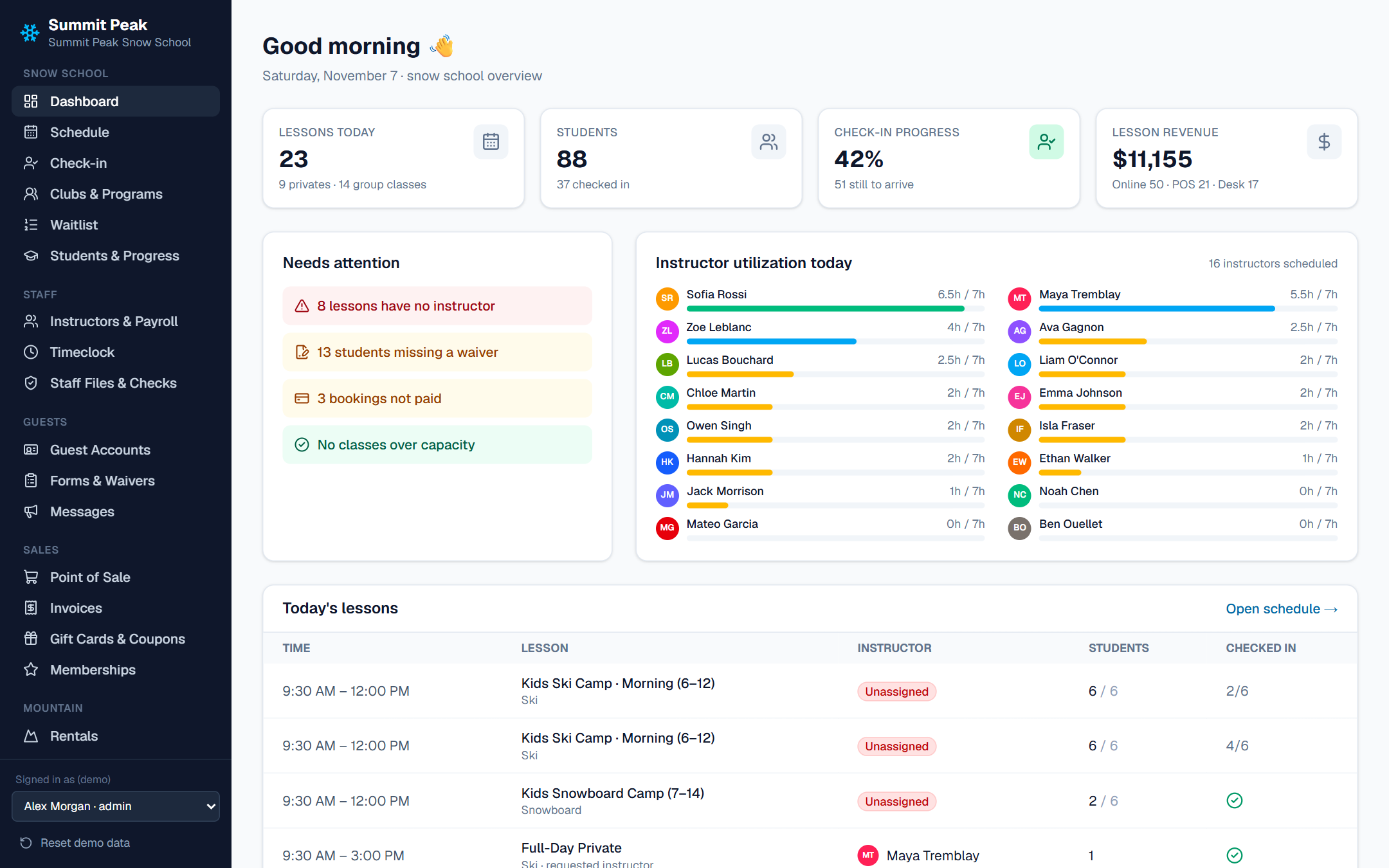
Live check-in count on the dashboard
Check-in
9:15 AM
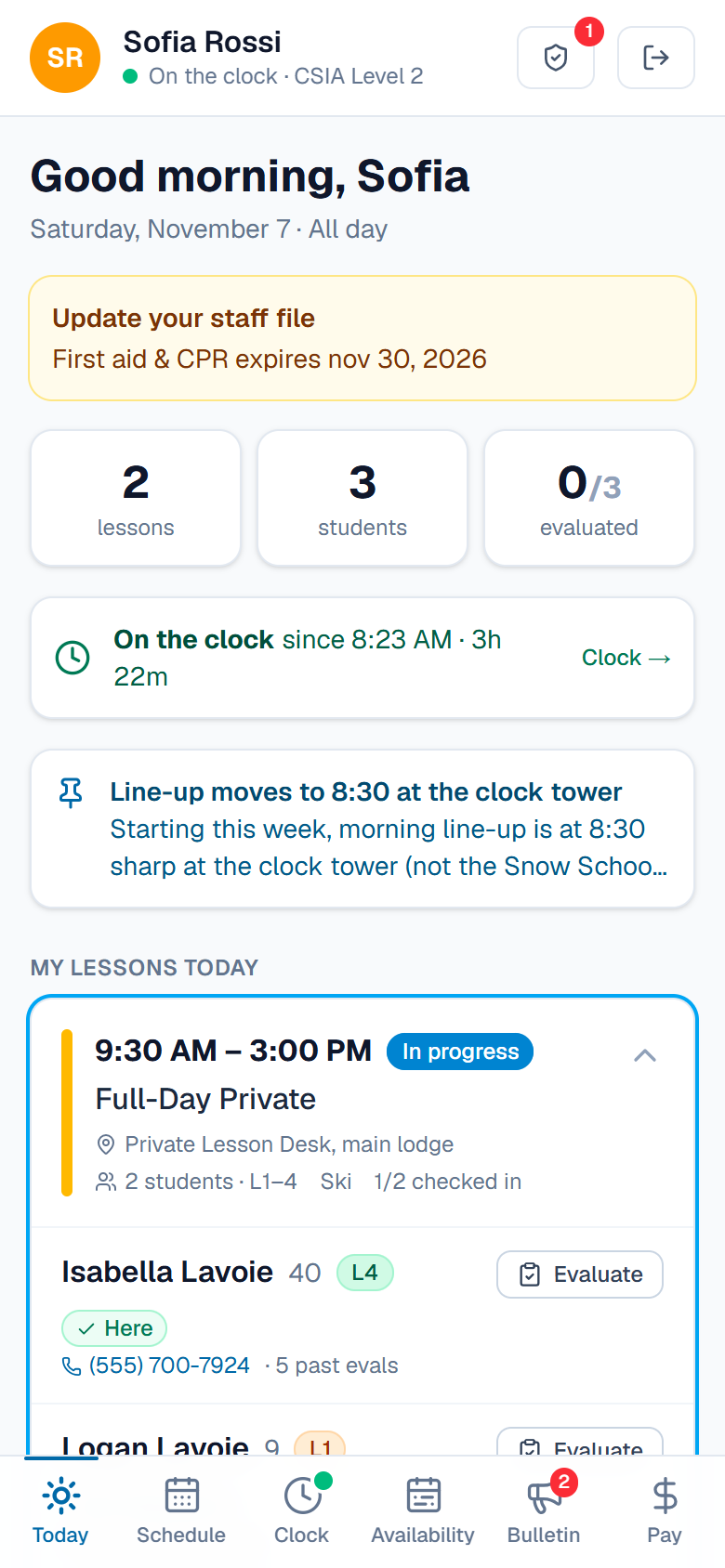
Instructors see their day on their phones.
Each instructor signs in with their PIN to see their lessons, their students and their levels. They clock in, set their availability for next week and check what they've earned.
My schedule and the staff bulletin board
Timeclock with supervisor approval
Pay to date, by lesson and by hour
4:00 PM
The day closes itself out.
Instructors leave evaluations against a skills checklist, and parents see the progress report in their account that night. Payroll is already counted, and revenue is ready for accounting.
Levels 1 to 9 with skills checklists
Progress reports parents can read
Payroll and sales exported to accounting
End of day
Lessons taught
23
Students checked in
88
Payroll hours typed by hand
0
Example day from the demo resort. Your numbers will be your own.
Features
One system for the desk, the snow and the office.
Supervisors, desk staff, cashiers, rental techs, instructors and admins all sign in to the same system. Each role sees what it needs, on a desktop at the desk or a phone on the hill.
01 For guests
Online bookingLessons and programs, instructor requests, waivers and card checkout in one flow.
Family accountSign in by emailed code to manage kids, programs, forms and receipts.
Progress reportsLevels, evaluations and lesson history parents can actually read.
WaitlistsJoin the line for a full class and get a held spot when one opens.
02 For the snow school
Lesson boardDrag-and-drop scheduling that blocks conflicts and wrong disciplines.
Check-in deskFind, sign, pay and check in from one screen.
Programs & clubsMulti-week programs with groups, coaches and attendance.
Instructor portalSchedule, availability, timeclock and pay on their phones.
03 For the office
PayrollLesson hours, line-up time, request bonuses and pay rates by season.
Point of sale & rentalsLessons, retail, food, gift cards and rental agreements.
MessagesMass email and SMS, automations and a staff bulletin board.
Reports & accountingRevenue, utilization and payroll, exported to your books.
Your books stay where they are. The snow school stops retyping them.
SnoDesk takes card payments through Stripe and sends email and text messages to guests. Sales, payroll and general ledger totals are exported to your accounting system, including Jonas Club Software for private clubs, so nothing is keyed in twice.
SnoDesk runs
Bookings, lessons and programs
Guests, families and students
Instructors, time and pay
The desk, POS and rentals
→ sales, payroll, GL← member accounts
Your systems keep
The general ledger
Payroll processing
Member billing
Card settlement in Stripe
Switch in the off-season
Moving from your current system? We bring over your guests, students and levels, and run both side by side until you're ready.
Every change on record
Who moved that lesson, refunded that booking or changed that pay rate. Change history is kept for every record.
Your own instance
Each ski area gets its own hosted copy, its own database and its own backups. Run by Gemini Logic, not shared with anyone.
Getting started
From first call to first chair.
1
Walk through
We see how your snow school runs today: lesson types, programs, the desk and payroll.
2
Set up
Your lessons, prices, levels, instructors, pay rates and season dates, configured with you.
3
Bring it over
Guests, students and levels move from your current system. Staff get trained on their own screens.
4
Open
Online booking goes live before the season and we're on the phone for opening weekend.
FAQ
Questions we hear a lot.
Is it only for big resorts?
No. It runs a public resort's ski school, a private club's member programs and a small community hill's lesson desk. You turn on the modules you use, and each role only sees the screens it needs.
We already have a booking system. How hard is it to switch?
We move your guests, families, students and levels across, set up your lesson types and pay rates with you, and can run alongside your current system while staff get comfortable. The best time to switch is in the off-season, so the first busy Saturday isn't the first day.
Do instructors need to download an app?
No app store. The instructor portal opens in the phone's browser and adds to the home screen. Instructors sign in with their own PIN.
How do guests pay?
By card online through Stripe, or at the desk by card, cash, gift card or, at a private club, charged to the member's account.
Does it work for private clubs?
Yes. Member families, member pricing, season programs and race teams are built in, and charges post to member accounts in Jonas Club Software.
How is it priced?
By the size of your snow school, not per user. Book a demo and we'll give you a quote for your operation.
See it running on a busy Saturday.
Book a 30-minute walkthrough with the team that built it. We'll show you the booking site, the lesson board, the desk and an instructor's phone, with no slides and no pressure.